jueves, 17 de septiembre de 2015

Package execution failed please check event log in DMF service box

I've been finding it difficult to locate some of our DIXF/DMF errors.  The below error occurs when we have a T-SQL database view as our data source, and we try to preview the data by an entity in a processing group, for example.

Error ES-ES: Error al ejecutar el paquete. Consulte el registro de eventos en el cuadro del servicio DMF.
Error EN-US: Package execution failed please check event log in DMF service box

We therefore need to move over to the server that is executing the data processing service, and check the event logs, origin 'DataMigrationImportExportFramework'.

DMF Service error: <Error><ErrorCode>-1071636471</ErrorCode><SubComponent>OLE DB Destination [40]</SubComponent><Description>Código de error SSIS DTS_E_OLEDBERROR. Error de OLE DB. Código de error: 0x80004005.
Hay un registro OLE DB disponible. Origen: "Microsoft OLE DB Provider for SQL Server" Resultado: 0x80004005 Descripción: "Error no especificado".
</Description></Error><Error><ErrorCode>-1071607780</ErrorCode><SubComponent>OLE DB Destination [40]</SubComponent><Description>Error con OLE DB Destination.Entradas[Entrada de destino de OLE DB].Columnas[Copy of TXT] en OLE DB Destination.Entradas[Entrada de destino de OLE DB]. Se devolvió el estado de columna: "El valor infringió las restricciones de integridad para la columna.".
</Description></Error>

Above I have highlighted the column that is causing the error.  In this case the database view was returning the TXT column without a value in one of the rows.  The error message is 'swallowed' by having so much architecture around the solution.
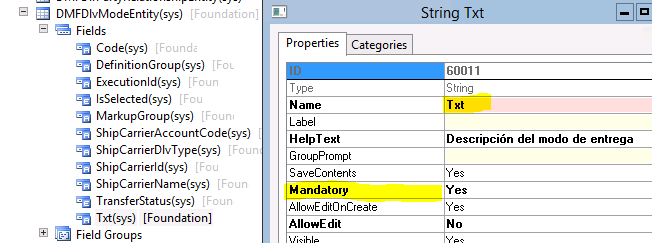
A mandatory column in the DMFDlvModeEntity, so no empty values please.
(But DlvMode.Txt is NOT mandatory)


viernes, 11 de septiembre de 2015

Be careful about what you name your new DIXF/DMF entities

After having ran our wizard for creating a new entity framework to import will be necessary to add the entity to the destiny entities table, below.

Entity name: Modelo de valor/grupo de activos fijos

Note, however the backslash that we have for the entity name, where it is taken directly from the form that manages these rows we wish to import.
This all works as expected, generating no warnings.  Also, we can now add the entity to a Processing Group with no problems.  It's the moment of actually obtaining the source data that generates the error.

System.IO.DirectoryNotFoundException: No se puede encontrar una parte de la ruta de acceso '\\Desrvsql2012\dmf\{B129C632-9B7D-40DC-860E-B7A1E120F01C}Modelo de valor\grupo de activos fijos..dtsx'.
It appears to have translated our name into part of a directory structure, and replaced the back slash with a forward slash.

Conclusion: Avoid these characters that may be either denied or misinterpreted by the Importation Exportation framework.

viernes, 26 de junio de 2015

Find Menu Items that call Jobs

During an upgrade from AX 2009 SP1 to AX 2012 R3 it is reasonable to assume that the AOT\Job node can be disregarded from the upgrade process.  That is until you find various menu items that point (ObjectType property) to those Jobs that have not been converted!
Menu Items are 99% of the time for launching Forms, Classes or Reports.
The first task is to find those menu items, and then to analyse if it's necessary to convert them.  Are they still relevant?  Finally, shoot the developer that is creating all of these Jobs were they should be creating classes for a more accessible and repeatable solution.

Below is a job...  To look for a Job ObjectType in the MenuItem node of the AOT.

static void Job_MenuItem_Jobs(Args _args)
{
    // Use X++ to Loop through the AOT for Menu Items that call....  Jobs!
    // http://blogs.msdn.com/b/dsiebold/archive/2010/08/13/use-x-to-loop-through-the-aot.aspx
    // http://dynamicsuser.net/forums/p/29232/154476.aspx#154476
    MenuItem    mi;

    void searchSubNodes (TreeNode _treeNode)
    {
        if (!_treeNode)
            return;

        _treeNode = _treeNode.AOTfirstChild();
        while (_treeNode)
        {
            if (_treeNode.AOTfirstChild())
            {
                searchSubNodes(_treeNode);
            }

            if (_treeNode.applObjectType())
            {
                mi = _treeNode;
                if (mi.AOTgetProperty("ObjectType") == "Job")
                {
                    info(strfmt("%1", _treeNode.treeNodePath()));
                }
            }
            _treeNode = _treeNode.AOTnextSibling();
        }
    }
    ;

    searchSubNodes (TreeNode::findNode(@"\Menu Items"));

    info("End");
}

This migration is going to be a long one.

viernes, 5 de junio de 2015

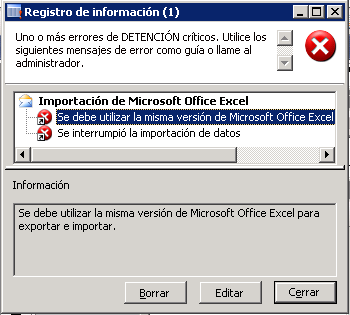
Error in a Definition Group export: "Same version of Microsoft Office Excel must be used for export and import."

Error - "Same version of Microsoft Office Excel must be used for export and import."

Se debe utilizar la misma versión de Microsoft Office Excel para exportar e importar.
I recall receiving the file from a Client to be imported via Excel/Definition Group.  There exists a KB2830391 that fixes this one, should you wish to address the issue permanently.

To quickly and painlessly resolve this issue, however I found a comment in the AXUG forum immensely useful:
"In excel file, on #DEF sheet, please change Excel Version to Office 2000, (strange, but it helps)."

Therefore I'd recommend exporting the empty Definition group (set the Export Criteria to a value that does not exist) and open up the Excel spreadsheet '#DEF' worksheet.  Compare that to the one that you have and probably it will be 'Excel Version' - 'Office2000'.  Paste the value to your spreadsheet giving you problems, and you would probably need to Save As the file as 'Excel 97 - 2003 (*.xls)'.
'Office 2000' - The secret sauce.

EDIT: 17/06/2015 - Second error now, with possibly a similar issue with Excel Versions.  Error:
"Method 'value' in COM object of class 'Range' returned error code 0x80020005 (DISP_E_TYPEMISMATCH) which means: One or more of the arguments could not be coerced."

One time out of twenty the spreadsheet would start to import data but that's a terrible success rate that is unlikely to complete when attempting thousands of records.
If you can even get this far, fall to your knees and start praying.

Solution:   Simply creating a blank Excel spreadsheet with the 'correct' Excel version and recreating each Tab with the tab name and selecting all of the data to copy across each tab.  We successfully imported the new spreadsheet from the data in the previous Excel workbook...  Also going outside for a coffee and giving each other a big hug may have helped with this particular issue (Hint: Don't touch a thing in the desktop environment while importing).

miércoles, 22 de abril de 2015

CLIENT FOUND RESPONSE CONTENT TYPE OF ”, BUT EXPECTED ‘TEXT/XML’.

I have just seen the following error on a production server, where no SSRS reports are successfully generated:

El cliente encontró el tipo de contenido de respuesta '', pero se esperaba 'text/xml'.
Error de la solicitud con una respuesta vacía.
The attempt to connect to the report server failed.  Check your connection information and that the report server is a compatible version.

The usual 'restart SQL Reporting Services' did not resolve the issue... This time.
Changing to the application configuration, business intelligence, reporting services parameters it was noticed that neither the Report manager nor the Web service urls worked,  They were indeed returning an empty response, aka ''.  It's therefore a pure reporting service or network error, and not an AX one as the parameters had not changed.

Finally the solution was found that the hard disk was full, and that no rows could be created in the tempdb database.  I presume other faults could produce this error, such as DNS changes, etc.

jueves, 1 de enero de 2015

AXUtil 2012 - s and db parameters

There are a few examples in blogs of the config switch for the AXUtil command.  However, I've not seen many that access the model store via the server and database switch.

Firstly, open up the Microsoft Dynamics AX 2012 Server Configuration and obtain the Server name with the Database name.

Server Configuration details
Let's change to the correct directory:
>CD \Program Files\Microsoft Dynamics AX\60\ManagementUtilities

Now, an example using the s and db switches:
AxUtil export /s:eszaractsql04\eszaractsql04 /db:zzzz_ax2012_db_prod_05_2014 /model:"VAR Model" /file:c:\temp\VARModel.axmodel

I assume that you will require access to the database, which is normally via the AOS service account.

Finally, an Error (0x80070005 E_ACCESSDENIED) can occur if we forget to add the path to the output file.

viernes, 19 de diciembre de 2014

Debug an AX 2012 SSRS report, data generation

A quick code example to enable you to debug the process of generating data for an SSRS report...

static void ZZZ_DebugReport(Args _args)
{
    TaxListTmp          tempTable;
    TaxListDP           dataProvider    = new TaxListDP();
    TaxListContract     contract        = new TaxListContract();
    ;
    
    contract.parmDisplaySalesTaxCharge(true);
    
    dataProvider.parmDataContract(contract);
    dataProvider.processReport();
        
    /*
    tempTable = dataProvider.getTaxListTmp();
    
    while select tempTable
    {
        info(strFmt("%1", tempTable.AccountName));
    }
    */
}


viernes, 24 de octubre de 2014

Missing: USR layer

Well...  At least I don´t have to look for changes in the USR layer.
SYS, SYP, BUS, VAR, VAP, CUS
...  But then I've not actully copied these entities across to the Production environment in Russia yet.

lunes, 20 de octubre de 2014

Error closing inventory, AX 2009

Attempting to close inventory in an AX 2009 installation.

Error executing code: The method has been called with an invalid number of parameters.
Seguimiento de pila: Se ha llamado al método con un número no válido de parámetros.

(S)\Classes\InventMov_Vir_Transfer_Closing\checkDimPhysical
(S)\Classes\InventUpd_Financial\updateFinancialReceipt - line 28
(S)\Classes\InventUpd_Financial\updateNow - line 67
(S)\Classes\InventUpd_Financial\updateVirtuelTransferClosing - line 69
(S)\Classes\InventCostItemDim\updateModelAverage - line 198
(S)\Classes\InventCostItemDim\updateModel - line 18
(S)\Classes\InventCostItemDim\updateItem - line 74
(S)\Classes\InventCostItemDim\run - line 35
(S)\Classes\InventCostHelp\run - line 139
(S)\Classes\InventCostClosing\run - line 44
(C)\Classes\InventCostClosing\main - line 13
(C)\Classes\FormFunctionButtonControl\Clicked
(C)\Classes\FormMenuButtonControl\Clicked

Resolution:
Modify the InventMov_Vir_Transfer_Closing class, checkDimPhysical method and add two optional parameters, thereby having the same signature as it's parent class InventMovement which was modified by a patch in the SYP layer:
//<ZZZ> IDS 15/10/2014 Correct inventory close error.
//boolean checkDimPhysical(InventQty _qty, InventDim _inventDim, boolean finalCheck)
boolean checkDimPhysical(InventQty _qty, InventDim _inventDim, boolean finalCheck, boolean _showError = true, boolean _checkPalletLocation = true)
//</ZZZ> IDS 15/10/2014 Correct inventory close error.
{
    return true;
}

SYP Changes applied to the InventMovement.checkDimPhysical method signature


viernes, 1 de agosto de 2014

AIF new enumaration field value

In the Microsoft MSDN document How to: Update a Service After Adding a Table Field it details the process as to how...  Well, update the AIF web service after adding a new table field.

Adding a new enumeration value, however, this process is thankfully unnecessary.
A shiney new Enum value
No AX classes are required to be updated, therefore just the published service requires to reflect the change.

Navigate to Basic > Setup > Application Integration Framework > Services and click Generate to create the necessary artefacts of all of the selected services that are published.  Don't forget to take a copy of the web.config file beforehand should you have made any necessary changes (example 2).


As a side note, I've been suffering a lot due to the AIF framework recently, and would recommend that if you are considering the option of AIF versus direct access to the database for read-only operation, in AX 2009, go for the latter in many use cases.  I'd recommend a proxy web service to handle the database calls (that includes pagination for example), just like AIF.  AIF isn't bad, it's just not of the same quality code as we're used to - some excellent examples.