lunes, 30 de mayo de 2016

Exam MB6-705 :: Microsoft Dynamics AX 2012 R3 CU8 Installation and Configuration


It's certification time!  Lets explore MB6-705, and learn something about installing, configuring and generally getting our hands dirty with an AX2012 R3 CU8 (or later) installation.  If you have access to the Microsoft Dynamics Learning Portal do try to pass through the '80672AE' training.  I highly recommend it although there is never enough content in the Security section for my needs.  Much of the information in MSDN is repeated in the 372 page AX 2012 Installation Guide (marked as IG below, version January 2015) and at the time of writing information such as Slipstreaming I could not find on MSDN at all.
Personally I found this exam difficult due to the wide range of competencies and knowledge required.


Plan a Microsoft Dynamics AX 2012 installation (15–20%)


Install, configure, and update Microsoft Dynamics AX 2012 R3 CU8 (15–20%)

Update Microsoft Dynamics AX 2012 R3 CU8

    • Describe Lifecycle Services, identify tools for updating the environment, understand and implement slipstream installations (1,IG pg. 43)

  • Manage users and security (15–20%)


    Implement services and manage workflows (10–15%)


    Manage reporting and analytics (10–15%)


    Manage the Enterprise Portal (10–15%)


    Manage Microsoft Dynamics AX 2012 R3 CU8 installations (15–20%)

    lunes, 22 de febrero de 2016

    DIXF\DMF Duplicate a Definition group

    With the data import/export framework we can easily and quickly import data from external data stores.  Here's an image I stole from the MSDN web site (it's at least 6 months old now so it's probably been moved, redesigned, relocated, deleted,..) indicating the basic steps:

    The migratory pattern of a database row in AX

    One of the more monotonous steps, should you be migrating data across multiple companies, is creating the data definition groups and adding the same entities to the group, but presumably with different parameters to import into the Staging table.  Example below where we use a stored procedure with a parameter to separate data across legal entities:
    With a DSN datasource calling a stored procedure, passing in a company data area identifier
    We can either launch the same definition group changing the parameters each time per company, or recreate the whole definition group with associated entities.

    There exists another option, however.  Why not get someone clever to write some X++ to just duplicate the whole definition group to another, empty group:
    Highlighted is our source group with the parameter that we are replacing
    Linked is the class (alt xpo download link) I've created, use at your own discretion.  The class will ask for a Processing group as it's source, and an optional parameter value that you will be replacing from the source.  It will then look for an empty destination Processing group that you will have created beforehand and recreate the entities present in the original replacing the parameter value. It'll finally also launch the assignments for you, automatically validating them.
    In the example above, the Asset table entity had a DSN datasource query as the following:
        EXEC HIEAssetTable 'HAL'
    Updated in the destination to:
        EXEC HIEAssetTable 'ZZZ'


    Finally, when copying DMF configuration data across AOS instances, we could also try to use the DMF framework itself to export then import the DMF data into a different installation?!  The concept makes my head hurt so I asked a colleague to set it up and it works.  Use at your own risk:
    Configure a DMF group, to set up your DMF data how you like it (AX 2012 R3 CU8 example).

    miércoles, 16 de diciembre de 2015

    Posting Packing Slip Examples

    I have been investigating the use of the chooseLinesQuery parameter in order to create a packing slip from multiple sales order lines.  Note the requirement to call chooseLines after having associated the query, which incidentally is called 'SalesUpdate'.  There are other parameters in the SalesFormLetter that can be used to avoid doing the heavy work of generating a query, such as relying on an array of Shipment IDs.

    Example 1, from Experts-Exchange.  Multiple sales orders in one document.
      SalesFormLetter salesFormLetter;
      QueryRun queryRun;
      Query query;
      str strSalesTable = "V683904, V683905, V683906";
      ;
        
      salesFormLetter = SalesFormLetter::construct(DocumentStatus::PackingSlip);
    
      query = new Query(QueryStr(SalesUpdate));
      query.dataSourceTable(tablenum(SalesTable)).addRange(fieldnum(SalesTable, SalesId)).value(strSalesTable);
      queryRun = new QueryRun(query);
    
      salesFormLetter.chooseLinesQuery(queryRun);
      salesFormLetter.transDate(systemdateget());
      salesFormLetter.specQty(SalesUpdate::All);
      salesFormLetter.printFormLetter(false);
      salesFormLetter.createParmUpdate();
      salesFormLetter.chooseLines(null,true);
      salesFormLetter.reArrangeNow(true);
      salesFormLetter.run();
    

    Example 2, using the WMSShipmentId (Shipment ID in the warehouse system) as the base for our packing slip.  Source here, and note the non-recommended way of instantiating the SalesFormLetter class.
      SalesFormLetter salesFormLetter;
      WMSShipment shipment;
      WMSShipmentId shipmentId = '008431_113';
      Set wmsShipmentSet = new Set(Types::String);
      ;
      wmsShipmentSet.add(shipmentId);
    
      salesFormLetter = SalesFormLetter_PackingSlip::newPackingSlip();
      salesFormLetter.allowEmptyTable(salesFormLetter.initAllowEmptyTable(true));
      salesFormLetter.multiForm(true);
      salesFormLetter.getLast();
      salesFormLetter.parmLineIdSet(wmsShipmentSet.pack());
      shipment = WMSShipment::find(shipmentId);
      salesFormLetter.update(shipment, systemDateGet(), SalesUpdate::PickingList, AccountOrder::None, false, true);
    

    Example 3, the most versatile of all, is to create a query filtering on some RecIds via multiple OR values.
        SalesFormLetter         salesFormLetter;
        salesParmUpdate         salesParmUpdate;
    
        SysQueryRun calcQuery()
        {
            RefRecId                salesLineRecId;
            Query                   qry = new Query(QueryStr(SalesUpdatePackingSlip));
            QueryBuildDataSource    queryBuildDataSource = qry.dataSourceTable(tableNum(SalesLine));
            QueryBuildRange         queryBuildRange;
            SalesLine               salesLine;
    
            // Dummy Query to generate a series of SalesLine.RecId
            while select RecId from salesLine
                where salesLine.CustomerRef == 'XXX'
            {
                salesLineRecId = salesLine.RecId;
                queryBuildRange = queryBuildDataSource.addRange(fieldnum(SalesLine, RecId));
                queryBuildRange.value(SysQuery::value(salesLineRecId));
            }
            return new QueryRun(qry);
        }
        ;
    
        salesFormLetter = SalesFormLetter::construct(DocumentStatus::PackingSlip);
    
        salesFormLetter.getLast();
        salesFormLetter.resetParmListCommonCS();
        salesFormLetter.transDate(systemdateget());
        salesFormLetter.proforma(false);
    
        // Let's create that ParmId
        salesFormLetter.createParmUpdateFromParmUpdateRecord(
            SalesFormletterParmData::initSalesParmUpdateFormletter(
                DocumentStatus::PackingSlip, salesFormLetter.pack()));
        salesParmUpdate = salesFormLetter.salesParmUpdate();
        salesParmUpdate.SpecQty         = SalesUpdate::DeliverNow;
        salesParmUpdate.Proforma        = NoYes::No;
        salesParmUpdate.update();
        salesFormLetter.salesParmUpdate(salesParmUpdate);
    
        salesFormLetter.chooseLinesQuery(calcQuery());
        salesFormLetter.reArrangeNow(true);
        salesFormLetter.validateAll(false);
        salesFormLetter.printout(Printout::After);
        salesFormLetter.printFormLetter(NoYes::Yes);
        salesFormLetter.chooseLines();
        salesFormLetter.run();
    

    Example 4.  Let's apply the user's printing options previously selected from the Sales form, and copy the settings to send it via X++.  Idea copied from here.
    SalesFormLetter salesFormLetter; QueryRun queryRun; Query query; str strSalesTable = "V683904, V683905, V683906"; SalesFormLetter_PackingSlip salesFormLetter_PackingSlip; Counter iCnt = 0; SRSPrintDestinationSettings printSettingsOrig, printSettingsCopy; container lastValues; ; salesFormLetter = SalesFormLetter::construct(DocumentStatus::PackingSlip); query = new Query(QueryStr(SalesUpdate)); query.dataSourceTable(tablenum(SalesTable)).addRange(fieldnum(SalesTable, SalesId)).value(strSalesTable); queryRun = new QueryRun(query); salesFormLetter.chooseLinesQuery(queryRun); salesFormLetter.transDate(systemdateget()); salesFormLetter.specQty(SalesUpdate::All); salesFormLetter.printFormLetter(true); salesFormLetter.printout(Printout::After); // User print settings from Sales order form if (iCnt == 0) { salesFormLetter_PackingSlip = SalesFormLetter::construct(DocumentStatus::PackingSlip); lastValues = xSysLastValue::getValue(curext(), curUserId(), UtilElementType::Class, classStr(SalesFormLetter_PackingSlip), formStr(SalesTable)); salesFormLetter_PackingSlip.unpack(lastValues); printSettingsOrig = new SRSPrintDestinationSettings(salesFormLetter_PackingSlip.printerSettingsFormletter(PrintSetupOriginalCopy::Original)); printSettingsCopy = new SRSPrintDestinationSettings(salesFormLetter_PackingSlip.printerSettingsFormletter(PrintSetupOriginalCopy::Copy)); } iCnt++; salesFormLetter.updatePrinterSettingsFormLetter(printSettingsOrig.pack(), PrintSetupOriginalCopy::Original); salesFormLetter.updatePrinterSettingsFormLetter(printSettingsCopy.pack(), PrintSetupOriginalCopy::Copy); salesFormLetter.usePrintManagement(true); //End salesFormLetter.createParmUpdate(); //AX2009? salesFormLetter.chooseLines(null,true); salesFormLetter.reArrangeNow(true); salesFormLetter.run();


    jueves, 1 de octubre de 2015

    Maximum buffer size 'problemo'


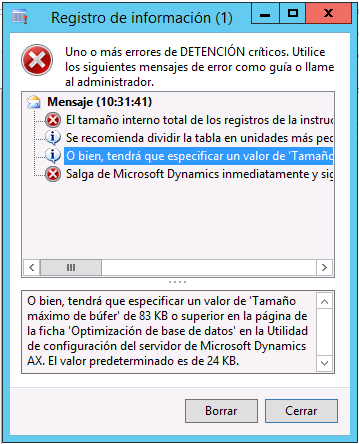
    We have seen the following max buffer size message appear in the Supplier (VendTable) form, after an AX 2009 to AX 2012 R3 migration.

    El tamaño interno total de los registros de la instrucción SELECT combinada es de 84418 bytes; sin embargo, Microsoft Dynamics está configurado de forma predeterminada para no sobrepasar los 49152 bytes.
    O bien, tendrá que especificar un valor de 'Tamaño máximo de búfer' de 83 KB o superior en la página de la ficha 'Optimización de base de datos' en la Utilidad de configuración del servidor de Microsoft Dynamics AX. El valor predeterminado es de 24 KB.

    Error: The total, internal size of the records in your joined SELECT statement is 84418 bytes, but Microsoft Dynamics is by default performance-tuned not to exceed 25600 bytes.
    It is strongly recommended that you split your table(s) into smaller units.
    Alternatively, you have to specify a 'Maximum buffer size' value of 83 Kbytes or higher on the 'Database Tuning' tab page in the Microsoft Dynamics AX Server Configuration Utility. The default value is 24 Kbytes.

    Solution 1: Firstly for an AX 2012 R3 installation we are able to increase the AOS maximum buffer size to 48 KB ...  In fact, it is recommended!  We already possessed this value in our installation however and this recourse is nowhere near sufficient.

    Solution 2: A quick compare for the aforementioned form shows us that two new table joins have been added.  One of these tables has been added as an inner join, for some reason, and the other is no longer a requirement.

    The clever people in Microsoft state that this is a main source of the problem "Because large joins and wide rows may lead to performance issues, we use this limit to catch performance issues and ask customers to rethink their joins."

    In this instance I'm not going to refactor the table.  For example.  If we had lots of text data added to the AX2009 CompanyInfo table I'd reconsider moving these fields to a completely new entity in AX2012.

    By changing one join to 'delayed' (probably doesn't affect the buffer size) and deleting one of the tables no longer required we reduced the size to...  79KB from 83KB.  Still a long way to go!
    I should also point out here that it's possible that there is some kind of caching going on and maybe I should have cleaned user cache files or from the tools menu update the various cache options available.

    Solution 3: Out of sheer frustration I also deleted the whole form back to the stone age (leaving SYS/SYP layer) but the error message returned was still with a huge max buffer size requirement...  Waaaaait a minute.  Let's reread the first sentence of this post.  Remember that we are performing an upgrade of an AX 2009 environment.  This leaves migrated table entities with a LOT of fields that are no longer required in AX 2012 - all marked with DEL_...  And some other fields have been brought across in the code migration as well.
    The 'DEL_' list goes on and on... This is known as a 'wide row'.
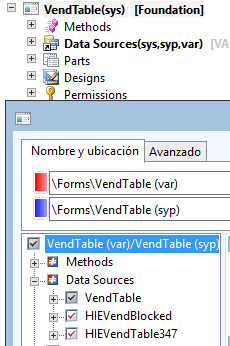
    In fact these other fields look suspiciously obsolete as well.  The whole 'address' and 'party' functionality has been revamped, and so I've deleted everything in the VAR layer except for those fields specific to the client - all of those that we have diligently named with a prefix (see second image for example).   The disadvantage of removing these 'Address' or 'PartyId' fields is that we have the old converted data there if you migrated both code AND data...  But I can see no other option but to delete them and move on.

    Firstly with the low risk option I shall delete (and synchronise) the large number of DEL_ fields from the table, and see if we reduce the max buffer size requirement from 79KB to...
    Bye-bye suckers!
    75KB.  Not a surprise really.  The DEL_ fields are all added to the buffer, but without being instantiated - From MSDN: "Due to the way the kernel handles data binding, the aggregated table column size is always the width of the entire table."  An interesting experiment.  Edit: Should restart the AOS to check if the buffer size has been changed.

    Next, we need to compare AX 2009 and AX 2012 VendTable models, and make sure we leave only 'valid' fields in the VAR layer.  In fact, there are only four fields that should be present.  Customer requirements and later Microsoft parches merged into the entity.  Everything else must go!
    AX 2009 SYP-VAR compare
    Both UseCashDisc and CashAccountRegime_ES are now in the SYS layer in AX 2012
    And now with only two new fields in the VendTable we reduced the requirement down to...  72 KB.  Uff.  No where near good enough.  Closing and reopening the AX client, a common trick, actually increased the requirement up to 75 KB.  The size probable depends on the row entity selected.  This is exasperating.

    Finally on this note the other tables referenced by the form query were checked and no other additional fields were found.

    Solution 4.  Field Groups, Relations and Indexes.  All must go out of sheer desperation.

    Nothing.  No change whatsoever.

    Solution 5. Restart AOS and try Voodoo.
    Those of you who have got running the AOS on the third attempt will know that black magic or something, works.
    By the time it takes to restart the AOS I managed to find and sacrifice a chicken.
    Error - 75KB Again.  Not even fresh blood from virgin poultry can save us.

    Solution 6: Increase the maximum buffer to 75KB in the server configuration utility, restart AOS and get back to work feeling completely useless and defeated.  At least it isn't 83KB.
    The End...

    Edit: It's a Sunday evening now and I'm laying awake in bed - What did I miss?  It's time to search the internet for the next two solution possibilities.

    Solution 7: Activate forceliterals on the Query object
    This will 'force the hand' of the AOS to accept the buffer allocation requirement, and allow your advanced query to run. Therefore allowing your QueryRun operation to finish as desired.
    I did NOT apply this solution due to the documentation in the MSDN article:
    You are advised not to use the forceLiterals keyword in X++ selectstatements, because it could expose code to an SQL injection security threat.
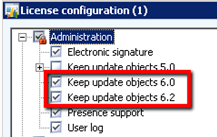
    Solution 8: Turn off Licence - Administration - Remove deprecated objects keys? [See also...]
    While turning these key off does not remove the physical data from the database the query that selects a disabled field does not now receive that field in the results set.
    The clever and handsome blog writer referenced above has also noted that the DEL_ fields may cause the buffer size to increase...  This approach involves unchecking the deprecated object key in the licence configuration will physically remove those fields from the database (unlike other licence keys in AX2012) with the SysDeletedObjects* configuration key - prior testing is therefore required, especially on customisations. Also, when considering how long it will take us to perform this operation it will be a  more 'efficient' operation than having to physically delete all of those DEL_ fields in each table in the VAR/CUS/USR layers.  My tests indicated that complex entities such as customers, suppliers, sales orders required the largest yet variable buffer sizes,..  Entities that initially had a buffer size requirement of 64KB dropped down to 49KB after removing the keys.  This is another huge saving, but keep in mind that in our client's case that they had all of the Keep update objects keys selected and was upgrading from AX2009.

    As indicated above there is a risk for those of you who are migrating code from AX2009.  Entities such as ledger accounts, employees or product dimensions have changed and if we have customised entities referencing fields of these old entities we may lose data in the process.  Identify the changes after deselecting the above keys and refactor.  An MSDN support blog post recommends waiting for 3 months before deselecting these keys in a production environment.

    Edit 12/2016: A senior technical consultant has just informed me that deselecting these deprecated object keys has enabled a 128 KB to 48 KB reduction in their buffer size.  That's seems too high to me, but I've decided that this solution is definately the one that will give us the most benefit.

    Solution 9: Deactivate all non related country functionality in the licence file
    Just when I was deselecting all of the 'Keep update...' keys I noticed the following in the licence configuration...

    System administration > Setup > Licensing > License configuration.... "My God, it's full of stars"
    It's ALL selected.  Every module, every country functionality, every everything!  The business Partner who can configure this particular AX installation would require a brain the size of a planet.
    'Marvin', an AX consultant, can configure your system as he knows about Thai taxes, where to submit your US 1099 statement, can configure the Russian address book and understands the Spanish custom of 'the invoice due date says August but we'll  pay you in September'...
    However like many that work in the ERP industry he is actually a maniacally depressed robot.
    While deselecting the UK Reverse Tax rules or Russian facture documentation is a good thing for those of you who don't have a registered company in these countries what I've concentrated on here is specifically removing fields from the buffer.  Deselecting the multiple countries from the licence file will have the effect of physically removing fields from the database.  Let's take a look below at the first few fields of the Customer table.
    All of the fields highlighted in yellow are related to country specific functionality.  Russia, Italy, Brazil and the BankCustPaymIdTable field that has a data type that is specific to Norway.  We can also see ACTMarkPriceRev in bold which is a field that exists in the VAR layer and I'm wondering if the end client still requires it's presence in the new version of AX?

    No one will give you a pay-rise for doing this shit - But it's important.
    The supplier form is down to 64KB!  Deleting a table from the join, removing unnecessary fields, deactivating many countries in the licence and deselected deprecated object keys has reduced the Suppliers form requirement from originally 83KB, to 79KB, then to 75KB and finally to 64KB.

    It's a Sunday night and I'm working.
    And 64 is such a lovely round number.
    Let's call it a day.

    Oh wait a minute...  I just deactivated Spain and I LIVE there.  Maybe you should talk to your business analyst before you start deactivating licence functionality?  Oh, and a compile of the application has produced errors with references to those DEL_ fields in the VAR layer that we just physically removed from the upgraded system.  Developer beware!
    It's 2 a.m. and we`re nearly there.

    Edit: 2 Months later...
    Solution 10: Reset/Clear your user's usage data.  If you can open the same row in the same form with a different user without problems, it might just work but I suspect that the solution is only temporary.  If the problem is a code migration like this one, try running out of work hours step 1 of the following blog post which performs a system flush.

    jueves, 17 de septiembre de 2015

    Package execution failed please check event log in DMF service box

    I've been finding it difficult to locate some of our DIXF/DMF errors.  The below error occurs when we have a T-SQL database view as our data source, and we try to preview the data by an entity in a processing group, for example.

    Error ES-ES: Error al ejecutar el paquete. Consulte el registro de eventos en el cuadro del servicio DMF.
    Error EN-US: Package execution failed please check event log in DMF service box

    We therefore need to move over to the server that is executing the data processing service, and check the event logs, origin 'DataMigrationImportExportFramework'.

    DMF Service error: <Error><ErrorCode>-1071636471</ErrorCode><SubComponent>OLE DB Destination [40]</SubComponent><Description>Código de error SSIS DTS_E_OLEDBERROR. Error de OLE DB. Código de error: 0x80004005.
    Hay un registro OLE DB disponible. Origen: "Microsoft OLE DB Provider for SQL Server" Resultado: 0x80004005 Descripción: "Error no especificado".
    </Description></Error><Error><ErrorCode>-1071607780</ErrorCode><SubComponent>OLE DB Destination [40]</SubComponent><Description>Error con OLE DB Destination.Entradas[Entrada de destino de OLE DB].Columnas[Copy of TXT] en OLE DB Destination.Entradas[Entrada de destino de OLE DB]. Se devolvió el estado de columna: "El valor infringió las restricciones de integridad para la columna.".
    </Description></Error>

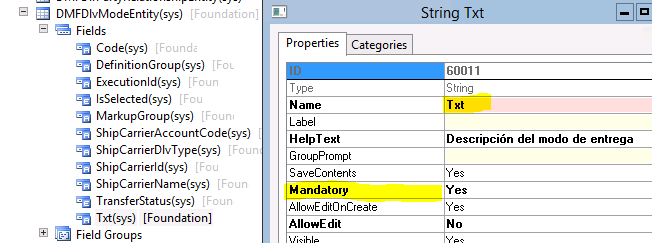
    Above I have highlighted the column that is causing the error.  In this case the database view was returning the TXT column without a value in one of the rows.  The error message is 'swallowed' by having so much architecture around the solution.

    A mandatory column in the DMFDlvModeEntity, so no empty values please.
    (But DlvMode.Txt is NOT mandatory)