viernes, 13 de julio de 2012

The command line 'runas' with Ax

We can test user groups and access rights for individual users within our own work environment using the runas facility, removing the need to authenticate across multiple desktop environments:

AX 2009
C:\Windows\System32\runas.exe /user:JANE.DOE@DOMAIN.local "C:\Program Files (x86)\Microsoft Dynamics AX\50\Client\Bin\Ax32.exe"
Or with an AXC file

C:\Windows\System32\runas.exe /user:JANE.DOE@DOMAIN.local "C:\Program Files (x86)\Microsoft Dynamics AX\50\Client\Bin\Ax32.exe \"\\Servidor-Datos\Perfiles AX\AX_2009_VAR.axc"
AX 2012
C:\Windows\System32\runas.exe /user:JANE.DOE@DOMAIN.local "C:\Program Files (x86)\Microsoft Dynamics AX\60\Client\Bin\Ax32.exe"
Or with an AXC file
C:\Windows\System32\runas.exe /user:JANE.DOE@DOMAIN.local "\"C:\Program Files (x86)\Microsoft Dynamics AX\60\Client\Bin\Ax32.exe\" \"\\Servidor-Datos\Perfiles AX\AX_2012_USR.axc\""

We can now create various short-cuts on our desktop for various users to test our security configuration changes but you will still need to know their password! The easiest thing to do is create dummy users in the domain and add them to the various user groups.

AX2012 + Security Development Tool 
Finally there is an excellent add-on for an AX 2012 development environment, the Security Development Tool.  A white paper by Junction Solutions (a Microsoft Partner) can be downloaded here, see page 11 and enjoy some pain-free testing!

lunes, 25 de junio de 2012

Invalid Descriptor Index

Error:
[Microsoft][SQL Server Native Client 10.0]Invalid Descriptor Index
I've seen this error twice now in Ax 2009, and it's time to tell the world about it.  We have an external SQL Server database to import and register new invoices.  Example:
SELECT InvoiceSeriesNum, Note, ServiceDate, ExchRateSales FROM SomeTable WHERE Transferred=0
Using the OdbcConnection/Statement/ResultSet/LoginProperty classes we can import the data.  Code snippet:
    _intCustInvoiceTable.AssetId            = _resultSet.getString(#IntCustInvoice_AssetId);
    _intCustInvoiceTable.InvoiceSeriesNum   = _resultSet.getString(#IntCustInvoice_SeriesNum);
    _intCustInvoiceTable.Note               = _resultSet.getString(#IntCustInvoice_Note);
    _intCustInvoiceTable.ServiceDate        = _resultSet.getDate(#IntCustInvoice_ServiceDate);
    _intCustInvoiceTable.ExchRateSales      = _resultSet.getReal(#IntCustInvoice_ExchRateVend);
It happens that we now have a new field to add to the query. Thus:
SELECT InvoiceSeriesNum, Note, ServiceDate, ExchRateSales, AnotherField FROM SomeTable WHERE Transferred=0
    _intCustInvoiceTable.AssetId            = _resultSet.getString(#IntCustInvoice_AssetId);
    _intCustInvoiceTable.InvoiceSeriesNum   = _resultSet.getString(#IntCustInvoice_SeriesNum);
    _intCustInvoiceTable.Note               = _resultSet.getString(#IntCustInvoice_Note);
    _intCustInvoiceTable.ServiceDate        = _resultSet.getDate(#IntCustInvoice_ServiceDate);
    _intCustInvoiceTable.AnotherField       = _resultSet.getReal(#IntCustInvoice_AnotherField);
    _intCustInvoiceTable.ExchRateSales      = _resultSet.getReal(#IntCustInvoice_ExchRateVend);
You'll notice, unlike me for the past two hours, that we've added the AnotherField out of order while reading it in from the ResultSet.  By moving it down to the same index as the modified query it should work.  The problem is most likely caused by reading columns out of order.  To resolve the error in the example above, simply move our new field highlighted in red down a line, or edit the original query to change the columns around.

miércoles, 13 de junio de 2012

Hotfix my Hotfix

I have just descovered a Hotfix which fixes a problem when a Hotfix is applied and erases the SysHotfixManifest class, thereby removing my only chance of finding out what Hotfixes have been applied.  I'll need a lie down now.

You can see an example of the SysHotfixManifest class here, listing each of the Knowledge Base patches applied as individual method names.

lunes, 11 de junio de 2012

Production environment problems with BI

I mentioned before that we were working with OLAP cubes and now is that giddy time to publish our work to the production environment.  However, when launching Administration » Setup » Business analysis » OLAP Administration the client application hangs with no idea as to what caused the crash.  It would seem that we were missing a component to interact with the Analysis service, which is obvious if I had bothered to read the installation documentation, page 51.

The missing component is the SQL Server Analysis Management Objects (AMO), which I am now installing on my computer.
I was able to install the AS 2008 October feature pack (X64) on an Ax client without the need to restart the OS nor even the AOS service if the client is on the same machine as the server.


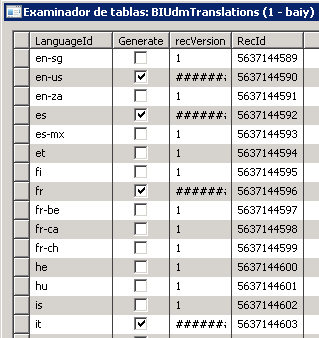
I'm so happy it works that I've even added a screenie of the thing filling up my precious BIEXCHANGERATES and SRSANALYSISENUMS tables.

Time to reprocess those cubes!...

Edit:  Agh!  I've lost my Spanish labels associated with the enumerations mentioned earlier.  This means that if my cube was filtering for the description of a transaction type enumeration in Spanish I'd only ever get 'Desconocido' or 'Unknown'.  This time I went directly to the BIUDMTRANSLATIONS table and manually checked the en-us, es, it, etc options to include these texts.

jueves, 31 de mayo de 2012

Configuring the Company Information Report Folder

While configuring the M-15 report for the Russia GLS layer in Ax 2009  I ran into the following error:

File C:\Exports\en-us_SalesInvoice_M15.xlt not found

I had set up the Company Information (CompanyInfo) Report Folder value incorrectly, and it should point to a directory 'inside' the Ax installation, holding report templates.  The location on the server will be similar to:

C:\Program Files\Microsoft Dynamics AX\50\Appliation\Share\Include\template\

In our case only two templates exist for the M15 report, in Russian and American English.  I really need to investigate this functionality for future development as it's a very versatile way of creating client reports.

jueves, 17 de mayo de 2012

Item type change from Item to Service

We've generated an error changing an item type to that of a Service.

In English:
Item type cannot be changed to %1 because inventory value has been posted for the item.
First set inventory value to 0.
In Spanish:
No se puede cambiar el tipo de artículo a %1, ya que el valor del inventario se ha registrado para el artículo.
Primero fijar el valor del inventario en 0.

Navigating to the item form (InventTable) and searching for the item we can see that the Availability of the item is not set to zero, we have some in stock.  We found a suggestion that we should therefore close off the inventory (MSDN), although manually updating the available quantity to zero (Inventory management > Forms > Item details > Available > Adjust Quantity) would work if there was no asociated inventory value in the purchase or sales order line for example...  Instead of closing the inventory I opted to adjust the posted value in the transactions to zero (Inventory management > Periodic > Closing and adjustment > Adjust > Transactions). 


In code use the InventItemTypeChange class to update item types, although in the job below I changed the visibility on the buildConfirmTxt static method to public...  For brevity and changes applied by the Eastern Europe/Russia GLS layer (GEEU tags in the code).
static void Job1(Args _args)
{
    InventItemTypeChange    iitc;
    container               confirmTxt;
    ItemType                itemType = ItemType::Service;
    ItemId                  itemId   = "YourItemId";
    #define.posCanChangeType(1)
    ;

    confirmTxt = InventItemTypeChange::buildConfirmTxt(itemId, itemType);
    if (conpeek(confirmTxt, #posCanChangeType) == true)
    {
        iitc        = new InventItemTypeChange();
        iitc.parmItemId(itemId);
        iitc.parmItemType(itemType);
        iitc.run();
    }
}

miércoles, 18 de abril de 2012

BI in AX with TMP


Working with Business Intelligence / Analysis Services I've come to realise how much we rely on temporary tables to do our work within Ax.  When only working at the database level we can't call Ax classes to generate our data.  My most recent issue was developing reports for budgeting purposes within the accounting module, when looking up budgetary balances within a financial period for example.  The LedgerPeriodTimeDimensions entity comes to our aid by generating a complete breakdown of those financial periods but this is a snap-shot of time and will not be updated as new periods are added.  As Sebastian Ohlsson points out:

...the recommendation from Microsoft is to make a backup of your database...
You have a table in Ax called LedgerPeriodTimeDimensions, it reflects Ax' ledger periods. This table needs to be updated as soon as you have modified the ledger periods. You update this table by going to Administration » Setup » Business analysis » OLAP Administration. Mark the OLAP server that should be updated.
Go to the Advanced tab and mark Update BI data  and click the Update databases button. After you have updated this table you need to process your cubes.

I had been relying on this entity for my work but didn't realise this dependency until I read the LedgerPeriodTimeDimensions table description within MSDN.  Why was this entity not prepended with the 'BI' or the 'SRS' label?

Edit: Execute the following in a job to just update those Enum changes in the SRSANALYSISENUMS table.
BIGenerator::PopulateSRSAnalysisEnums();

lunes, 9 de abril de 2012

Adding a secondary Cust/Vend address via X++

We're integrating with an external system once more.  This time we need to add an invoice address to the clients we are importing.  We already have a primary mail address, but on some occasions the invoices are directed to a department full of some patient ladies with very thick skin.
 
I find the way Ax 2009 deals with the global address book quite complicated but help is on hand in the form of a white paper (AX 2012 version).  However, I started by looking at the CustTable.deliveryAddress() and the Address.insert(..., ...) methods.

Below is an example of adding and editing the secondary invoice address:

static void Job1(Args _args)
{
    CustTable       custTable;
    DirPartyTable   dirPartyTable;
    Address         invoiceAddress;
    ;
    
    custTable       = CustTable::find("1");
    dirPartyTable   = DirPartyTable::find( custTable.PartyId );
    
    // Find private address for invoicing
    invoiceAddress = Address::find(dirPartyTable.TableId, dirPartyTable.RecId, AddressType::Invoice, true);
    if (!invoiceAddress)
    {
        invoiceAddress.AddrRecId    = dirPartyTable.RecId;
        invoiceAddress.AddrTableId  = dirPartyTable.TableId;
        invoiceAddress.type         = AddressType::Invoice;
        invoiceAddress.IsPrimary    = NoYes::No;
    }

    invoiceAddress.Name             = "Invoice Addressee";
    invoiceAddress.CountryRegionId  = "ES";
    invoiceAddress.Street           = "Calle de los perdidos";
    invoiceAddress.ZipCode          = "50000";
    invoiceAddress.City             = "Zaragoza";
    invoiceAddress.County           = "ZARAGOZA";
    invoiceAddress.State            = "AR";

    invoiceAddress.AddressMap::formatAddress();
    if (invoiceAddress.RecId == 0)
    {
        invoiceAddress.insert(true, false);
    }
    else
    {
        invoiceAddress.update(true, false);
    }
}

viernes, 30 de marzo de 2012

Development -> Preproduction -> Production Server

In theory our preferred server setup would be the title of this blog entry.  We can be a bit less robust with out development environment but the pre' and production servers should be in almost exactly the same state.  However:

What if the client hasn't bought a licence for developing with X++ and relies on their Microsoft Partner to do so.  AND what if the client the partner has is an all singing all dancing licence instead of being exactly the same as their client, plus the development modification.  One of the issues I've found was with deleting company data where we couldn't eliminate company (dataarea) related data as we no longer possessed the licence key for that part of the application.
I assume the error is caused by not possessing the licence key to part of the production module.
Applying the all singing all dancing licence finally allowed us to eliminate the company.  The proper licence was then reapplied once more.  When duplicating company data ensure that you have the 'proper' licence installed before exporting across servers! 

sábado, 10 de marzo de 2012